10 Reasons Why To Choose Magento for Your E-commerce Website
While there are likely dozens of other e-commerce platforms to choose from, Magento is arguably the most popular e-commerce system available, and for good reason. Built in PHP, Magento is an open-source platform for online retail that has been around since 2008. It has been voted the #1 e-commerce system by the Internet Retailer B2B 300 e-commerce guide and is used by top companies such as Nike, Samsung, Ford and many others. Below are just some of the reasons we highly recommend using Magento for your next e-commerce project.
1. Open Source
Magento is completely open-source, and the standard Community Edition is available totally free of charge. While there are premium extensions available for purchase, the core functionality needed for an ecommerce platform is readily available free of cost.
2. Community Support
Like most other open source projects, Magento has a large development community that is constantly working on maintaining and updating the platform to ensure its security, reliability and speed. Thorough technical documentation and support for Magento is also available directly from their official homepage.
3. Built Specifically For Online Retail
Unlike WordPress (arguably the most popular CMS in the world), Magento was built specifically and solely for e-commerce applications. While it is possible to combine WordPress with another e-commerce platform like WooCommerce, the ability to have all functionality already built-in has the benefits of reliability and compatibility you can count on from an integral system like Magento.
4. Maximum scalability
Regardless of the size of your company, whether it be just a small local business or a multinational corporation, Magento is capable of handling any work load. It is highly scalable, capable of growing with you as your business grows – no wonder it is used by major Fortune 500 companies and small businesses alike.
5. Performance
With regard to query processing, page load speed and other performance factors, Magento consistently outperforms other e-commerce platforms such as Shopify, PrestaShop, Zen Cart and others. While the difference of a few hundred milliseconds in load time may not seem like much, page load times are a huge factor in making the difference between converting new customers or those site visitors turning to your competitors instead.
6. Flexibility
Largely due to its open-source architecture, Magento is highly flexible and customizable. While the default functionality of the platform is already quite powerful, developers are constantly creating new plugins (or extensions as they are called in the Magento world) to widely spread this functionality.
7. Easy third-party integration
Magento has extensive support for most all third-party services you may need to integrate into your shop, whether it be your favorite payment gateway, shipping company or database applications, it’s likely there is already a way to integrate the service into your Magento webpage.
8. SEO Friendly
Similar to WordPress, Magento is very SEO-friendly. The content management system’s default installation comes already loaded with common SEO functions such as sitemaps, search engine-friendly URLS, meta tags, descriptions and more.
9. Mobile Compatible
Magento is intended to be a fully-responsive and functional application for mobile devices, just as much for regular desktop use. With the ever-increasing prominence of mobile internet use, having an e-commerce platform intended for mobile use is only going to strengthen your chances of converting those mobile visitors.
10. Advanced Inventory Management and Invoicing Features
Built for use by retailers both large and small, the Magento system allows for literally up to 500,000 products, all contained within a single web page. Multiple stores can be managed from a single installation of Magento, and items sold on different domains can all be managed by the same administrative dashboard. The inventory management features of Magento allow for extremely advanced customization.
The Top 9 tips to improve sales
Color and weight create better content hierarchy than size. Make a prominent phrase bolder and write secondary information with a lighter color. These are just a couple small tips that make content navigation in your Magento store easier for customers. In this article you will find a number of valuable Magento development tips.
1. Consider the website loading speed
The speed of your website is one of the most crucial things to pay attention to, as even a couple of seconds’ delay will make your customers change their mind and choose another store. Here are some tips on how to improve your website’s speed:
– Update your Magento Software Version
Updates not only bring new features, they also fix bugs and improve the overall platform. So, if you experience lag while using your website – it may be time to upgrade from Magento 1 to Magento 2. Besides, Magento makes a point of notifying you whenever a new version is available, so it’s unlikely you will miss a new version.
Before updating make sure you have done a complete file and database backup. These simple precautions will help you restore the site in the advent of any mishaps.
– Don’t forget to clean your Magento logs
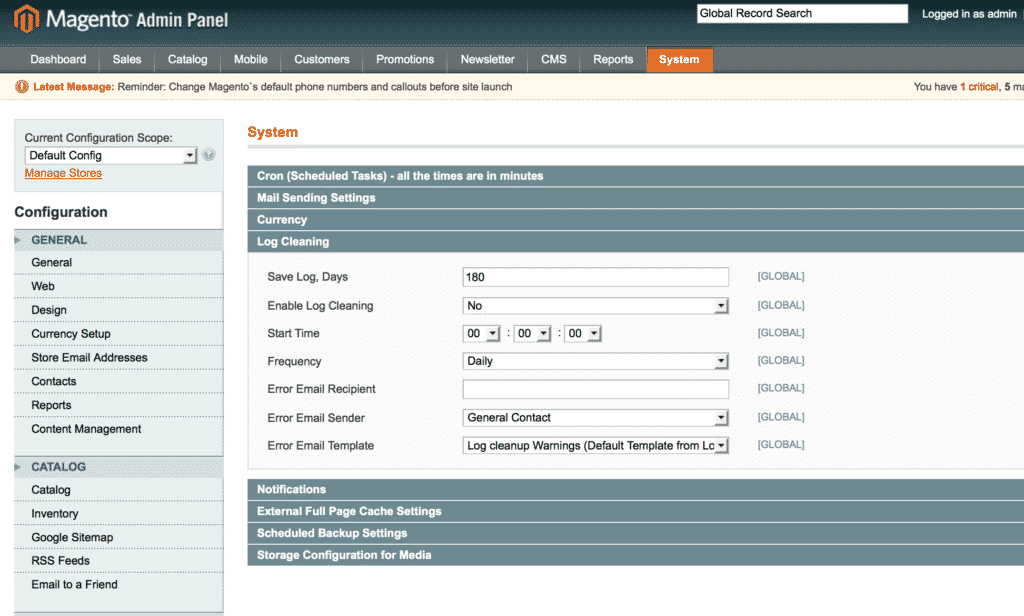
Logs may compose up to 80% of all of your Magento shop data (sometimes even more). Though these notes are useful sometimes, it is better to delete them in order to release the system from overload. In order to do this, go to System > Configurations > Advanced > System > Log Cleaning. Then set the preferences and get rid of unnecessary logs.
– Reindex data
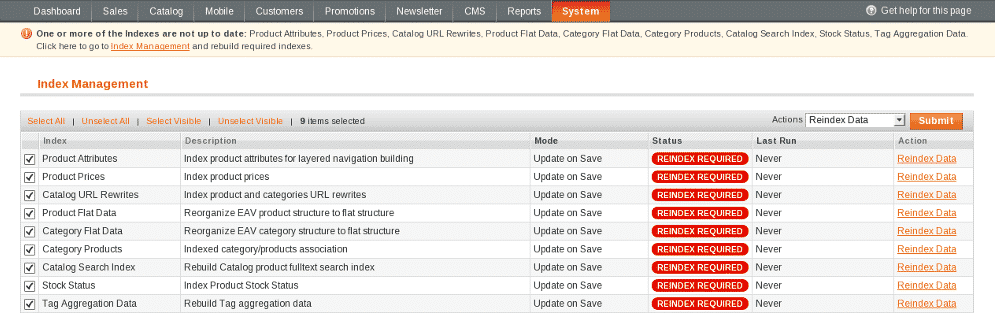
Indexing is how Magento gets the information from the database and reorganizes it to display in your shop. The data which changes frequently, like prices or discounts, must be reindexed. Otherwise it will take more time to load the page with this information or it may not be shown correctly.
To reindex, go to “System†and then to “Index Managementâ€. In the “Actions†graph, choose “Reindex data†and then click “Submitâ€. If you want to reindex one particular object – click “Reindex Data†on its right. After that the whole process will be over.
– Use a CDN (Content Delivery Network)
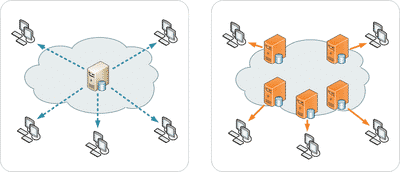
A Content Delivery Network is a group of servers working together and located in different parts of the world. As a system of servers, a CDN gives users faster access to the requested resources. For example, when a website is hosted in Russia and the End User lives in the US, it is better to use a CDN server located in the US rather than to deliver content right from the host. In such a manner, your speed will be several times faster and you will grant quick access to users from the furthest points.
2. Enhance your navigation
Users must always be able to find what they want, spending as little effort as possible. This is an issue of navigation. If a website is well organized, it becomes easier for a customer to find the desired products.
To make navigation easier, understand your customers and their needs. Divide them into groups and determine the easiest way for them to search. For example, we set up two user categories and figured out how to help them find what they want.
Customers who are not sure about what to choose. These visitors may have an idea of what they want, but they need help in choosing the exact product. Provide them with filters on price, brand, size, etc. Set “Featured products†and “You may also like†in such a way that you will give your customers a wider range of choices.
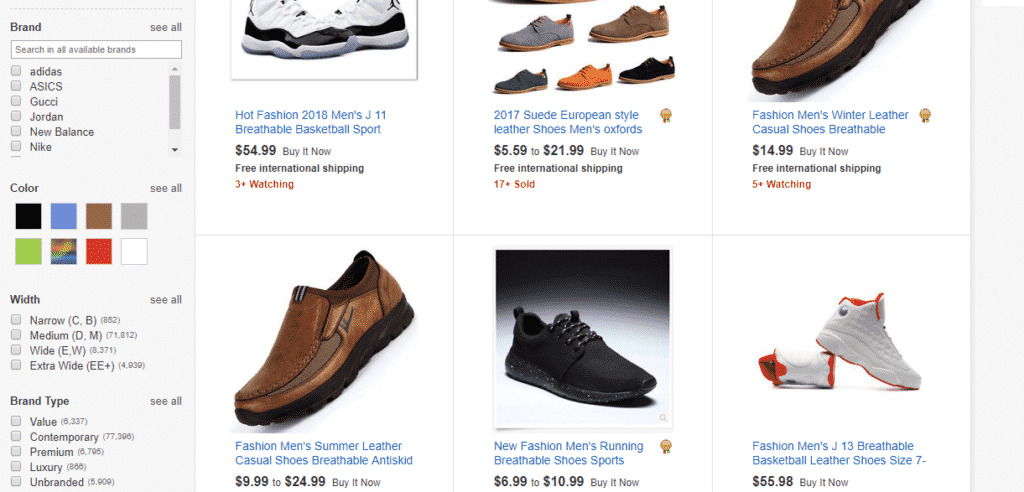
Customers who came for a particular product. They don’t need filters as they know what they want. Make the Search bar easily available with autocomplete. Now if they can’t remember the exact name, the Search’s autocomplete feature will give them a clue. And don’t neglect the site map – some users are sure about the category and just want to buy something from there.
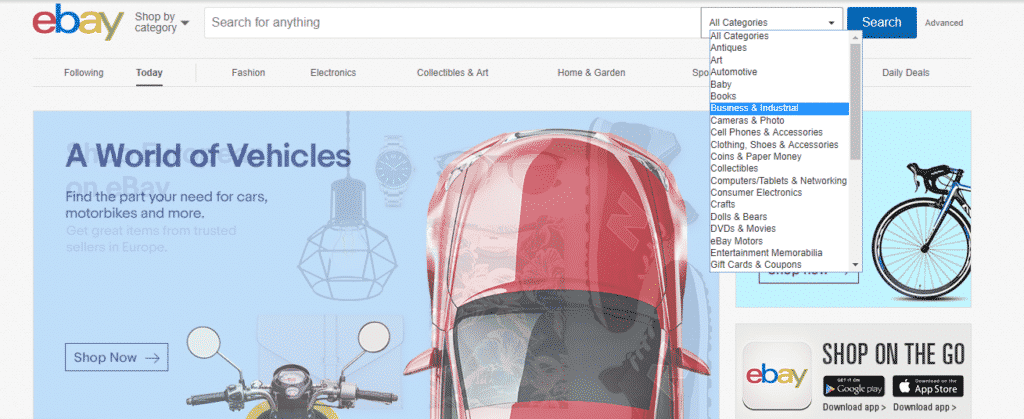
These are two basic groups. Still, you can create new categories that fit your product best.
3. Let people write reviews
As 85% of customers trust reviews as if they were personal recommendations, we can’t miss the opportunity to benefit from them. Don’t wait for your customers to leave a review – ask for them directly. Send them a message either via email or on social media. Direct messages are less likely to be ignored, so most people will leave a comment even if they didn’t have an intention to at first. Moreover, some of your visitors may have missed the possibility to leave feedback and your letter will inspire them to do that. Just don’t overwhelm your visitors with a large number of options while chatting – get to the point and address only reviews.
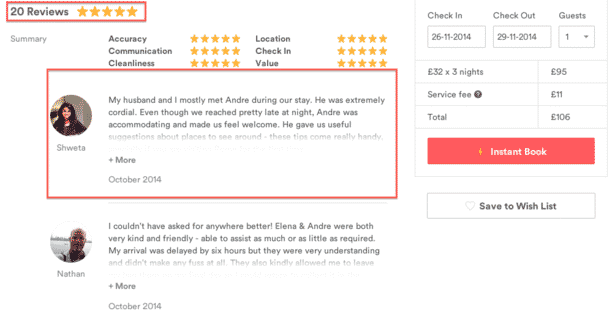
Testimonials have another advantage. By leaving reviews, users generate unique content, which is extremely useful for your SEO marketing Services. It will give your website more credibility in the eyes of search engines, subsequently improving your ranking. One way or another reviews will help your store receive more customers.
4. Make social integrations
Social media is the best way not only to gain references, but also to communicate with your audience. This is the easiest way to spread news about your store. Moreover, you can share your customers’ posts about your products. Photos of people using your goods will be a great review for you, so just find your customers’ boasting about their new purchases and repost them. It is profitable for both of you: the author of the post will get feedback and you will receive a happy customer.
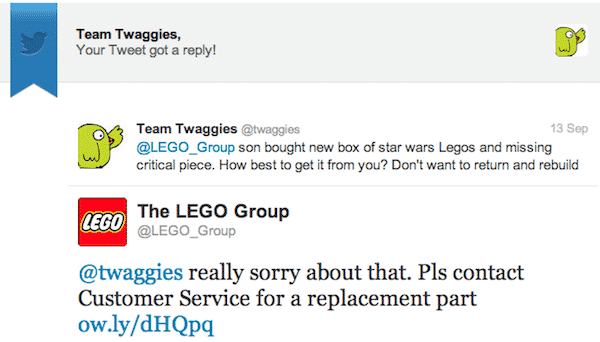
You shouldn’t spend all day on social media. Just find an hour or two, create a couple of posts on all networks you are registered with, work with the customer, and surf a bit – you may find something interesting for your business.
5. Provide fast and qualified feedback
Feedback doesn’t always mean the answer of technical support. Feedback is also a response to a user’s action on the website. Gmail is a good example of a good approach – they give plain information on almost every action. Moreover, you can immediately undo each action – an important feature for users still learning the platform.
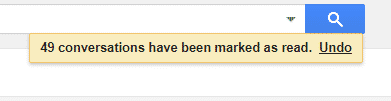
Having this kind of feedback allows users to better understand how to interact with your platform. This gives them better control and familiarity with navigating your store.
6. Divide one large task into several smaller tasks
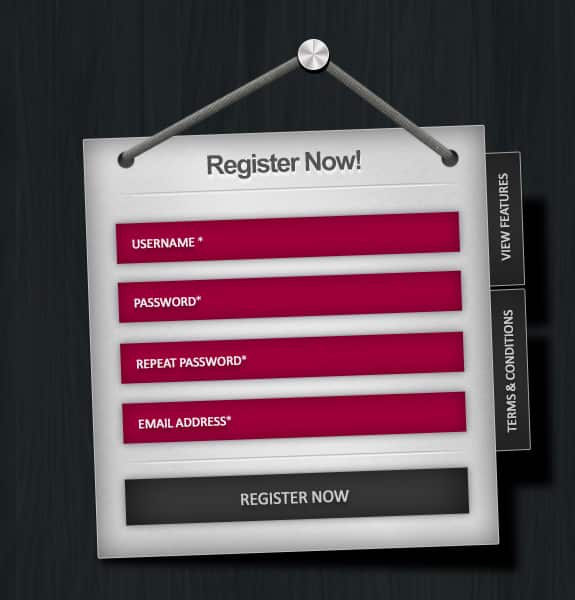
You can implement one of the greatest peculiarities of the human psychology into your store. No one likes big assignments, but if split into smaller tasks with a progress bar and immediate rewards (such as, “Great, now move forward!â€), your customers will be more likely to fill out a big registration form or anything else requiring multiple steps. This is the rule of easing and you may apply it to any sphere of your life, not just eCommerce.
7. Dealing with abandoned carts
Cart abandonment is a common problem of all store owners, as nearly half of all visitors leave their cart to the mercy of fate due to “unreadiness to buyâ€. But it doesn’t mean you shouldn’t focus on an abandonment reduction strategy, as the other half doesn’t consist of confirmed purchasers either.

To reduce the number of customers leaving you should understand that abandonment doesn’t mean your potential buyers have lost interest. On the contrary, they wanted to purchase, but met a certain obstacle. Your task now is to restore their intention to purchase and the best way to do this is to send them an email.
Abandoned Cart Emails are one of the simplest and most effective ways to reduce the abandoned cart percentage. Still, writing a good letter may be tricky, so here are some tips that will help you:
– Write a good Subject Line
The abandoned cart subject line is the first thing your recipient sees, so it must be catchy. It should both point out the issue and grab their attention. The best subject lines should invoke emotions and be personal. Consider “Tommy, you’ve left something over here!†or “Your cart was abandoned, please help itâ€. Don’t be afraid of adding a bit of humor and using the name of the customer – it’s worth it.
– Show what the user left behind
An image will give a better understanding of what’s at stake, so show your potential customer what he or she will lose if they don’t immediately come back and purchase. The best way here is to create a hero image with the product on it.
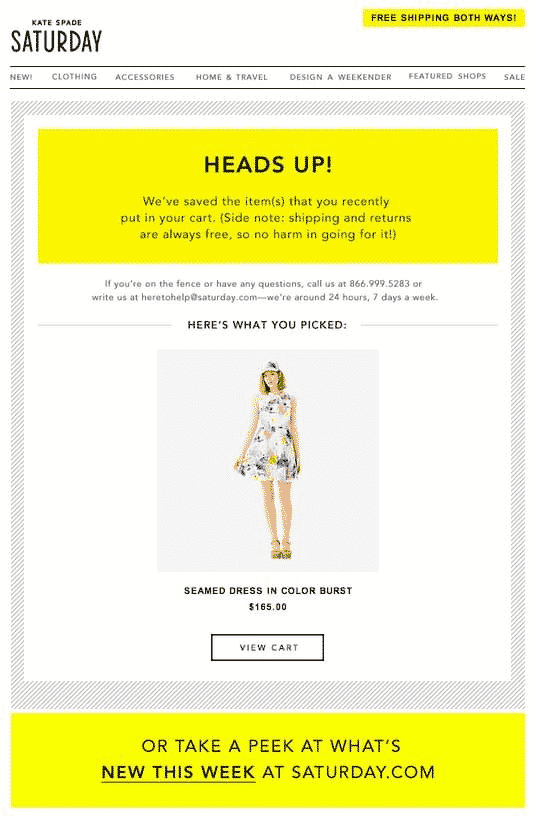
– Call To Action plays a central role
There will be little sense without a smart Call To Action. It must be visible and not hidden in the end of the letter. Put the CTA just under the image and highlight it. Thus your customer will be sure about what to do next.
– Offer something
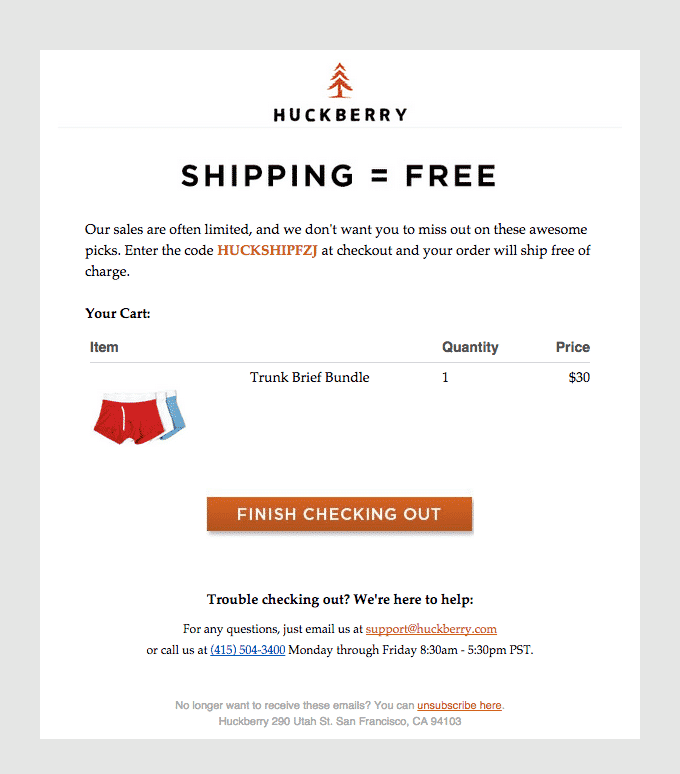
Remember when we mentioned an obstacle? Now we must try to resolve it for the customer. There are a number of potential obstacles such as high final price or expensive shipping. Show your visitor that you have a free shipping offer (if you do, of course) and explain how he or she can get it. Tell them about your discounts or show the “You might also like†field – maybe the user just couldn’t find the right color.
8. One Step Checkout
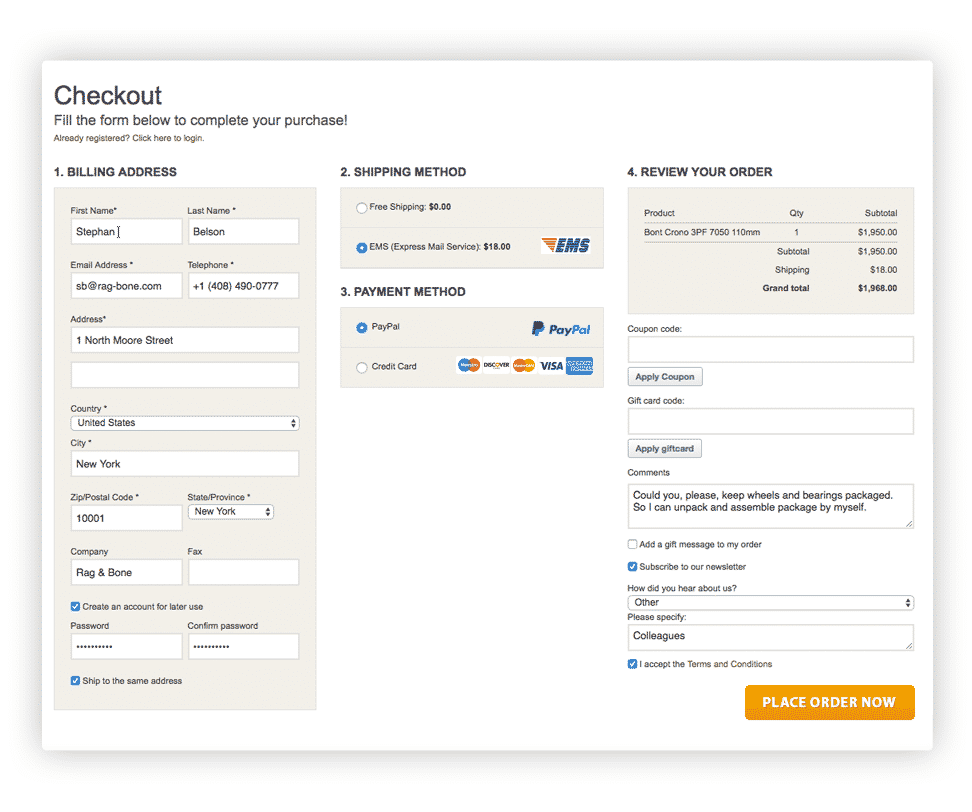
There is another way to reduce cart abandonment – One Step Checkout. This is a collective name for many extensions that deal with making the classical Magento checkout process easier. Put simply, these extensions just collect all the checkout steps and transform it into a single page. Moreover, you may also find here some examples of great UX solutions. Just look for the extension that will most perfectly suit your needs.
9. Up-selling and cross-selling
The more goods users buy from you – the better for your business. In this case, help them with it! Leading marketing experts have found two good techniques for boosting sales:
– Up-selling
 Image 15. A quick explanation of Up-selling.
Up-selling is a practice of selling more expensive products via additional items or upgrades. For this you must show that the extended version satisfies the needs of the customer better than the basic one. Try to understand what people want when they look for a particular product and give them a better solution. Just don’t be aggressive and let customers compare goods. Here are some examples:
A cashier at a fast food restaurant offers a larger size of fries when you order a small one
A website gives you a number of different subscriptions with different prices and advantages
An airline company offers a passenger to upgrade their coach class ticket to a business class ticket
A game development company produces different editions with varying amounts of added content
An online smartphone store shows you a number of other more expensive devices to compare
– Cross-selling

Apart from up-selling, cross-selling deals with other techniques. It is a practice of selling an additional service or a product with the chosen one. There may be related products that don’t come in one set, such as a camera and a memory card, or just items that may fit together, such as shoes and a shirt in the same style. Providing a customer with an example of how these products work together or offering a discount will increase the chances of a purchase. See some examples of cross-selling below:
A cashier at a fast food restaurant offers an additional sauce to an order of fries
A salesman at a bike shop suggests to buy a lock with a bicycle
A car dealer advises to buy a trailer in addition to a truck
A waiter at a restaurant offers desert after the main course
In conclusion
Increasing the convenience of navigating your eCommerce store will increase conversion rate in parallel. Remember that people will not only buy your products when they find what they want easily, they will also likely recommend your store to their friends. Convenience offers many opportunities for you to develop your eCommerce business.
Learning Up-sells, Cross-sells & Related products in Magento

“Up-sellsâ€, “cross-sells†and “related products†are three similar but distinct concepts in Magento that are useful to know about. Two of these usually appear while on a product page, the other typically appears when in the shopping cart. Effective use of these three tools can help you get the most out of Magento.
Up-sell products are items that you would like to entice your customer to purchase, instead of the product they are currently viewing. These are items that are in the same category as the one they are currently viewing, but are more expensive, better quality, etc.
Related products also appear when viewing a given product page, but they are products that are intended to be bought in addition to the one the user is currently viewing.
Cross-sell items can appear both on a product page and in the shopping cart, but they are more akin to an impulse purchase – you can think of these as the online equivalent of items near the checkout lines in grocery stores.
Reasons to use up-sells, cross-sells and related-products
Cross-selling and up-selling work great on existing customers: The probability of selling to an existing customer is 60 – 70%, while the likelihood of selling to a prospective purchaser is 5 – 20%, according to Marketing Metrics.
According to a 2009 survey by Internet Retailer, 35% of Amazon’s sales are generated by cross-sales.
Cross-selling and related products are also beneficial to customers in that they can purchase any necessary supplementary products all through a single merchant.
Where to use cross-selling, up-selling or related products
Before a purchase: in the product or category page below the main product or on the sidebar.
During the purchase: in the shopping cart, at checkout and in abandoned cart emails.
After purchase: in follow-up emails.
Up-sells
As already briefly explained, up-sells are intended to get potential customers to spend more money on a more expensive/feature-rich model of the category of products they are already viewing, or by adding some additional premium component to it. An example of an up-sell would be having several more expensive computer monitors displayed on a product page for a cheap monitor.
Related Products
Related products are products intended to be purchased in addition to the product(s) the customer is already viewing. An example of related products would be having a box of nails displayed on the product page for a hammer, or offer a mouse and keyboard to someone purchasing a desktop computer. The more easy it is for a customer to purchase items they are likely going to need to together, the more likely they are to buy them.
Cross-sells
Cross-sells are items typically displayed on the shopping cart page, after an item has already been added to the cart, although they can also appear in other situations. The purpose of cross-sell products is to direct customers to purchase items they likely wouldn’t have thought of / purchased otherwise. An example might be having product such as batteries or dish soap displayed to a customer with a shopping cart otherwise filled with clothing items. You can think of these cross-sell items as having a similar function to products seen near the checkout aisle in a grocery store – not specifically related to items the customer is already purchasing, but may catch their eye or be deemed a worthwhile additional purchase.
Strategies
Here are some useful strategies for making the most of up-sells, cross-sells and related products:
Bundle Products
Bundling products allows for an opportunity to attract customers with an entire set of complimentary products. Often these product bundles will be offered at a price break, but they also allow you to sell items that may never have been bought under other conditions.
Do not offer expensive add-ons
The cost of supplemental purchases should be directly related to the initial item price. These add-on items should cost no more than 25% of the initial product price.
The primary draw of an effective up-sell is being able to offer the customer some reason to purchase an upgrade/add-on now, instead of later or not at all. There should be some significant benefit to be gained in order for the customer to be sufficiently motivated.
Show A Range, But Don’t Overload The Customer
Having too many available choices can lead to confusion. In the case of related products, it’s better to choose less but more suitable or more related products than displaying tons of available options. If you do decide to show a wide selection of items, use a carousel to display them.
Display Products According To Relevance
The more relevant a set of product suggestions are, the closer they should be displayed to the main product.
Personalize Headlines
Personalized copy works better than general headlines. For example, ‘You might like’ is more inviting to a prospective customer than ‘People also view’. Some other suggestions for headlines to use:
“You may also be interested in…â€
“Complete the look…â€
“May we suggest…â€
More Reasons Why You Should Choose Magento for Your Online Store

Responsible for about 20 percent of the world’s websites, WordPress is often recognized as the best platform for content management. While that’s the case, Magento dominates in the world of ecommerce, boasting a 24.6 percent share of the market. Widely recognized brands like Samsung, Nike, Nestle and Vizio use Magento for their digital storefronts. Like large, established brands, many small and mid-size retailers use a Magento developer for their ecommerce websites.
With such a large number of retailers using Magento, there are plenty of reasons why you should consider using the platform for your online store. Here are some of the leading reasons you should use Magento:
Open Source
To understand the significance of Magento being Open Source, you need to think back in time to when you had no choice other than to hire a web design company to create a website for your business. When you hired a third-party to design your site, the developer would create your website from the ground up.
If you wanted to switch to another developer down the line, you had to hunt and peck for someone who was willing and able to take over a system someone else developed. And that’s assuming you were still allowed to use the system you paid for.
Thanks to Open Source, many Magento developers collaborate on the same project and they make the resulting code available to anyone who wants to use at no cost. The same developers maintain, manage and update the code. Because Magento is somewhat like public property, you can still use your Magento-based website if you decide to switch from one Magento developer to another development company.
Versatility
Magento is an extremely versatile platform. You can operate multiple websites that each have very specific requirements, such as using different currencies and synchronized inventory tracking, with one install using Magento.
Large Number of Features
Magento has a large number of features that make if fun and easy to operate an ecommerce website. These features make is simple for you to use other tools, such as Google Content APIs. Coupon codes, email template and newsletter management, special offer pricing, customer grouping, multiple shipping methods, and product bundling are just a few of Magento’s many helpful features. If you don’t have access to a feature you want, you can simply add an extension for it.


SEO-Friendly
Considering search engines are constantly changing their algorithms, Magento is about as SEO-friendly as they come. While you may need to make some modifications to keep up with changing algorithms, Magento will get you off to a great start with respectable URLs, meta tag controls, website maps and a user-friendly template structure in the available default themes.
Although many themes are already mobile-friendly, Magento has a wide array of free and paid extensions available for its users. You can use these extensions to further improve your ecommerce store’s SEO friendliness just like you can use them to add desirable features to your ecommerce website.
Scalability
If you’re like most ecommerce retailers, you’ll want your online business to grow over time. You’ll want to increase the size of your customer base, increase traffic and process an increasingly larger number of orders every day. While those are laudable goals, it’s important to realize that not every system can support growth easily or smoothly.
With Magento, you can grow your ecommerce business and adjust your website as necessary with ease. And you can do so without having to have code rewritten or scheduling hours of costly downtime. That’s because Magento is fully scalable to accommodate even the largest online retailers, including Amazon.
Community
As an ecommerce retailer, you can go quite a while without actually interacting with a person. Especially if you’re just starting out and you’re working from your home. With a Magento web design, you’re part of a large community that includes developers, programmers, bloggers, managers and executives around the world.
While you may not engage these folks in casual conversation, it’s helpful to know that you’re part of a global community. It’s also good to know that other community members will work with you to maintain a safe and quick ecommerce platform.
Multi-Tasking
With Magento, you can do several things at once, saving you valuable time that you can spend on other tasks. Magento has an intuitive, user-friendly admin panel where you can manage things like billing and customer information in one place. Magento is also flexible, allowing you to customize the backend of your website to suit your preferences and improve your efficiency.
Mobile-Friendly
Magento is combined with HTML5 so websites using this platform are able to provide pleasant experiences for mobile shoppers. Magento is able to adjust the size of images and the platform supports video with ease across devices.
Easy Integration
When you have a Magento website, you’ll be able to easily integrate your site with a wide range of third-party services. These include payment processors, database applications and shipping providers. In addition, Magento already has built-in Google tools. These tools include Google Analytics and Google Checkout.
High Performance
As the operator of an ecommerce store, you know that consumers don’t like to wait when they’re shopping online. Even the slightest delay can cause shoppers to move on to the next online outlet. With a Magento web design, you don’t need to worry about the performance of your website because Magento excels with both page loading speed and query processing times.
Security
Every Magento web design is PCI compliant. This means that every detail related to your customers is stored in a secure environment. If you experience a security issue with your website, Magento’s own security center can help out.
Magento Tutorials Available Online

As we’ve illustrated above, Magento is arguably the best shopping cart option available for any e-commerce business. While you can certainly pay someone to manage your site after it’s been built, it’s extremely valuable to know what goes into handling administration on the backend, especially if you’re going to maintain your online store yourself.
Due to the power and wide-ranging scope of Magento’s capabilities, it sometimes can be a little intimidating for novices unfamiliar with the platform or experience with any other content management systems. To help mitigate the learning curve and instill a sense of confidence when working with the platform, we’ve rounded up some of the best available resources (both free and paid-for) for learning Magento.
Magento Tutorials Available For Free
Level Up Tutorials
Level Up hosts a large variety of video tutorials on all things related to web development technologies. Their series on the Community edition of Magento is exceptional, offering over 40 videos that range from installing the platform, all the way to more advanced configurations. This a good place to look if you’re just getting started with Magento.
Tutorial Magento
 If you prefer written guides over the video format, Tutorial Magento is a good resource. They offer 40 short and easy-to-follow guides on various topics like setting up Configurable Products, Adding Custom Tabs to Product Pages, and other features you’re likely to want to know as you build your online store.
YouTube
YouTube is an enormous resource for just about anything, and Magento is no exception. There is tons of free material available on the platform. A good idea is to filter your searches by most views, as this tends to result in the most useful and trusted videos.
SiteGround
SiteGround is a popular web hosting provider, but they also have an excellent database of tutorials on general Hosting info, WordPress, Joomla, and of course Magento. Their Magento tutorials are a pretty good starting point for those who like to follow text-based guides.
Paid-For Online Tutorials
Tuts+
Tuts+ has been around for quite a few years now, and has earned a reputation as a trusted resource for tutorials of all kinds. The price point of $15/month is also an incredible value, allowing you access to every tutorial available on the site. While they have several free written tutorials on Magento available, the “Magento Fundamentals†video course is a worthwhile investment, taught by a certified Magento developer. Please note that this course is at an intermediate to advanced level, assuming at least some knowledge of and experience with basic web development.
Udemy
Udemy is another major player in the realm of subscription-based online courses and tutorials. They offer six different courses on the subject, ranging from beginner to advanced. Their Introduction to Magento Community Edition For Beginners is a fairly extensive overview for those just coming to the platform for the first time. While their courses have to be purchased individually, they offer lifetime access and a 30-day money back guarantee.
Magento U
Lastly, Magento offers several courses themselves, each tailored to either Developers, System Administrators or Merchants / Marketers. If you don’t mind the $119 price point, the Merchant Track course is a good fit for those wanting an in-depth guide to taking their management of the Magento platform to the next level.
Seeking a Magento developer? Contact Sunlight Media.
If you need a Magento developer for your online store, you’ll find the experts you’re looking for right here at Sunlight Media. We’ve specialized in Magento web design for many years and have helped numerous local start-ups establish a dominant online presence.
Don’t forget to also check out our Magento FAQ page for further information.
 Author Bio
Angelo has been involved in the creative IT world for over 20 years. He built his first website back in 1998 using Dreamweaver, Flash and Photoshop. He expanded his knowledge and expertise by learning a wider range of programming skills, such as HTML/CSS, Flash ActionScript and XML.
 Keep checking out for 8 actionable methods included in this Magento 2 list to enhance your website.


 Back up your data. Before performing the migration, make a backup of your database. This is important as you don’t want to lose any data. If your database isn’t duplicated, it could lose important data. A duplicated database will allow you to easily find and remove outdated data. Once the copy is complete, you can start working on the Magento 2 installation. If you have any customizations or extensions, these will be migrated as well.


 There are many benefits to using Magento as your eCommerce store platform. One of the biggest is the fact that it can be used by anyone regardless of experience. With the help of this eCommerce platform, you can build a basic store without any technical knowledge. This will save you time and money as it will be easy to make changes and add new features to the site. Another benefit of Magento is that it’s user-friendly. It will look great on any device, including mobile devices.
 A CDN is a service that enables a website to quickly serve huge amounts of data. A content delivery network helps websites deliver large downloads, HD videos, and flash sales to users quickly and reliably. It also allows sites to reduce the amount of money that they have to pay for external costs. Using a CDN will greatly increase your online store’s speed. It will also increase the number of repeat visitors.
 Data Marketing Technology